2012/08/14

That Conference: Testing Code From The Pit Of Despair

This session was presented by Phil Japikse.

  • http://www.telerik.com/zerotoagile for a podcast
  • Legacy Code == any code not under test, has a high technical debt, is icky
  • If the code is working and nobody asks you to change it, why change it?
  • Why change code
    • Killing bugs
    • Adding Features
    • Optimize Resources
    • Removing FUD
  • Make one change at a time
    • Fix or add just one thing
    • Test after every change
    • Commit after every passing test
  • Tools of the trade
    • TDD
      • Building up of the Lego blocks of code
      • Inside-out building
    • BDD
      • Don’t start with individual pieces to build the whole
      • Outside-in building
    • Mocking
      • Fakes, Stubs, and Mocks
      • Fakes have working implementations. They’re Hardcoded, not suitable for production
      • Stubs provide canned answers
      • Mocks are pre-programmed with expectations. Essentially creating a specification. They also record behavior
    • Dependency Inversion
    • UI Testing
      • Typically Manual
      • Often tested by customers
      • Tools becoming better
  • Testing and Refactoring
    • Be save; if you don’t touch the code it won’t break
    • Safety Blanket: Integration tests
    • Code Isolation and Refactoring
      • find a change point
        • Finding the point that breaks
      • create a seam
        • the weakest link of the system/class/method
        • use Dependency Injection
        • use commercial mocking
      • add a new test
        • Use test-eventually style
      • refactor
        • Extract Methods
        • Reduce Complexity
        • DRY
        • SOLID
      • Make sure you’re actually isolated
        • Continue to drill down
        • If code is self documenting, we don’t need as many code comments
      • Fix the target issue
        • Code is isolated, tests are in place, switch to T/BDD
        • It’s turtles all the way down
  • Test/Behavior Driven Development
    • Write a failing test
    • Make the test pass
    • Refactor: Remove magic code; add use cases

That Conference: Managing the .NET Compiler

This session was presented by Jason Bock

  • Talking about Project Roslyn
  • The compiler (csc or vbc) is simply a black box
  • There are 44 switches you can throw at csc!
  • Microsoft wants to stop all the re-implementations of the parsers, thus what Roslyn is meant to be
  • CTP == Could Trash PC
  • Only support for C# & VB initially
  • Can be used for things similar to StyleCop like enforcing consistency.
  • Can be used for a deep understanding of Code
    • Like a WCF Operation Contract that is one way, but is returning a value
    • Can provide quick fixes based on the analysis
  • No time schedule for release

That Conference: Truth and Myth in Software Development

This session was present by Leon Gershing (aka Ruby Buddha). The subtitle is “Truth, Myth and Reality.”

  • Git Immersion and Ruby Koans
  • “Do as I say or…”
    • You’re inferior
    • Your priorities are off
    • You can’t be successful
    • You are worthless
    • You’re not a developer
  • A different way of looking at the world is actually a good thing, stop being negative about it
  • Don’t be so dogmatic about something, it just takes practice.
  • Testing, like everything else, is a tool to help you get better at what you do
  • It’s okay to listen to dogma, but don’t just accept it at face value. Always evaluate the information.
  • Everyone must find their own path; their own subjective reality
  • Myth: that which preceded you is invalid.
    • Reality: waterfall is dead. Long live Agile!
    • Agile is Dead…in the same way that punk is dead
  • Agile manifesto was written by 10 hippies…
  • Perception is Reality
  • Where are you heading?
    • Only you can decide where you want to go
    • No one can tell you the answer except yourself
    • Changing your mind about your current path doesn’t bind you to that path, it changes the direction of the path
  • Find forced mentors
    • people that inspire you on any level
    • Have lots of them
    • remember that celebrity is just being popular, not that you want to be just like him
    • Seek out wisdom from all places; from people and locations of all ages and locations
  • Wisdom, like mustaches and mullets, can’t be given. They must be earned.
  • read the poem “The Perfect High” by Shel Silverstein
  • Pro-tips:
    • Read more code than you write, not books or anything else, just read code
    • Write code, and then write it again, then delete it, then write it again, then delete it, then write it again, then…
    • Play with others. There is a big difference between knowledge and wisdom.
    • Trust your instincts.
    • Think AND Feel. It lets you understand everything and have some empathy
    • Enjoy now.
    • Don’t rely on your own excuses (I don’t have the time).

That Conference: Vim–An Introduction for Visual Studio Developers

Presented by Michael Eaton. I attended this session mainly because I’ve realized how much I rely on the mouse lately and how much it slows me down. I enjoy working on my Lenovo ThinkPad because it has the little mouse stub in the keyboard so my hands never have to travel far from the keyboard, but it still takes time to navigate using the cursor just to navigate around. Not only is that slow, but it’s been killing the index finger to fly across a screen.

  • Everything comes down to “My <insert topic here> is better than yours!”. It really just comes down to “Use what you want to use”
  • Vim is definitely far better for touch typist rather than the hunt-and-peck typists.
  • Vim is designed to be really close to the home row.
  • Vim written by Bram Moolenaar and others.
  • vim/gvim/vsVim/viEmu
  • Command mode, insert mode, visual mode, execute mode
  • [i] to go into Insert Mode
  • [Esc] to go back into Command Mode
  • in CM, [Shift]+[A] to go into the end of a line and goes into insert mode
  • Basically look for a Vim tutorial
  • vim is a pure command line editor
  • gvim is the graphical vim editor so it’s slightly friendlier GUI version of vim
  • http://github.com/alanstevens/KickassVim
  • http://vim.org
  • http://pragprog.com/book/dnvim/practical-vim

2012/08/13

That Conference: Designers? We Don’t Need No Stinkin’ Designers!

This session was presented by Jon von Gillern. Admits much of the presentation is based on Mark Miller’s good UX presentation.

  • Wrote Nitriq and Atomiq
  • Why focus on UI?
    • Happy customers == more money
    • Good UI is taken for granted, bad UI is easier to notice
    • Pour UI adds up
  • How can we measure UI
    • Keystrokes
    • Mouse Travel distance
    • Gaze Shift (eye travel distance)
    • Recall Rules of interaction
    • Find signal among noise (don’t make the user think about what they’re looking for)
    • Variance from user mental model (does the UI behave how they expect it to?)
    • Mental Time = Total Time – Physical Time
  • Mental Costs – things that prevent users from getting into the “flow” of being productive
    • Lose of focus
  • Good UI is:
    • Clear (in purpose)
    • Concise
    • Consistent
  • Tools for UI
    • Contrast
      • visual difference between two elements
      • “Visual Weight should match information relevance” – Mark Miller
      • Eyes are attracted to greatest contrast (similar to why young kid’s shows are generally primary colors because they are so different)
      • Nitriq example: Actions have more contract, Information has less contrast
      • Google “WCAG 2.0”
        • Relative Luminance
        • Contrast Ratio
      • Black Text vs White Text article
        • Green, Red, Blue for the order that the eye can tell differences in shades.
      • Testing Tools
    • Color
      • Can represent differences
      • Lots of color == Lots of noise
      • Work with a limited color palatte
      • Hue, Saturation, Luminesces vs Hue, Saturation, Value
      • Pick a hue for a color, and add others by changing the saturation & value
      • Kuler
      • Read the article on Wikipedia
      • ~5% of humans have some form of color deficiency
      • Use Red & Blue, not Red & Green to account for color blindness
    • Size
      • Easier to find large items
      • Important information should be larger
      • Relationship to precision
        • Common actions should be larger
      • Test on the worst device to allow for finding if sizes still work.
    • Ordering
      • You can scan up & down faster than left-to-right
    • Motion
      • Effective for helping guide gaze
      • great for entrance & exits
      • use acceleration/deceleration (easing)
      • Fade in with size at the same time to affect flow documents
    • Shape
      • Icons are a kind of shape
      • Depend on context (flow chart, etc)
    • Fonts
      • Sans-serif: quick to read/recognize
      • Serif
        • better for long chunks of text
        • Character by character legibility (“1” vs “l” vs “I”)
      • Dyslexia
        • Kerning, Symmetry
        • Comic Sans actually helps with this…or just buy a specialized font
    • Parallel vs Serial
      • Don’t display information in serial if it can be done in parallel
        • Modal Dialogs
        • Combo Boxes when seeing all options
    • Shadow/Glow
      • Can help differentiate UI that “sits on top” of other UI
      • Glow can help defuse similar colors that sit on top of other items
    • Gradient
      • Transferring gaze
    • Proximity
      • Similar data should be close
      • Similar actions should be close
      • Vice Versa
      • Bad proximity causes gaze shifting
    • Interaction Patterns
      • http://quince.infragistics.com
      • Remember Parallel vs Serial
      • Just because a pattern doesn’t mean it’s good
      • Immediate, continuous feedback
        • Progress Indicators
        • Preview Hinting
    • Know your users (who, how many, how often)
      • Discoverability
      • How often specific features used
      • gather telemetry
      • Don’t be afraid to steal ideas
    • UI Checklist:
      • What are the 3 most important screens
      • What are the 3 most important pieces of data
      • What are the most important actions
      • Are you using the same terms as your users

That Conference: Roughing It: .NET development from the command line

This session is presented by Jon Polfer.

  • “In the beginning was the Command Line”
  • Programming is about using words, why not use them as the primary way to interact with the computer
  • Vi/Vim for Unix; VsVim for Vi bindings in Visual Studio; Vi-Emu plays nicer with ReSharper
  • Graphical Vi-Vim Cheat Sheet
  • Using MSBuild
  • CScope
    • Have to create a cscope.files file to tell CScope what files/paths to look into
    • CScope –b –q for building the index only and quietly
  • http://db.tt/PQ2HWqjk for all the code, examples, & slides

That Conference: How to Rapid Prototype Like A Boss

The next several postings are likely to be brain dumps from sessions I attend at That Conference, so they may not make a ton of sense to those who didn’t attend. But then again, why didn’t you go? It’s being held at a water park in Wisconsin Dells in the summer so you can bring your family along with.

This session was presented by Matthew Carver.

  • Author of forthcoming book “The Responsive Web”
  • Wireframes
    • Can be truly rough hand drawings or digital layouts that are still cheap to produce
    • Until a line of code is written, everything is just theory
    • Wireframes can become a “Comp”: Comprehensive Layout
  • Comps
    • Comps are simply a snapshot of the UI, but they lack the full interactions and responsiveness
    • They’re too rigid
  • Why Prototype
    • Fill in the gaps
    • Can anticipate actual scope of the project
    • Offer site/content managers to start testing out ideas before any actual code is written
  • Tools
    • Foundation 3 by Zurb
      • Uses SASS
    • Bootstrap by Twitter
      • Uses LESS
      • Not built specifically for prototyping
    • HAML
      • Specifically for Rails, but makes for quick view development
    • SASS
      • A CSS3 extension
  • Basics of Prototyping
    • Reach conclusions from the wireframing
    • Placeholder images: placehold.it/300x300 == a 300 x 300 image
    • Foundation had a number of build in button style, which gets more into the art direction instead of just prototyping
    • Visibility classes for different browsers/sizes

2011/12/23

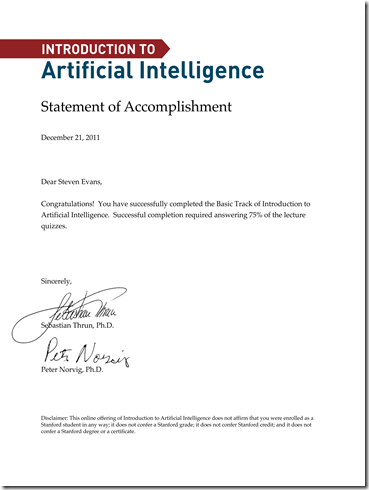
Well I certainly feel accomplished

Another year drawing to a close and looking back I certainly have done quite a bit over the past 12 months.  The one I’m currently proudest of:

Introduction To Artificial Intelligence - Statement of Accomplishment for Steven Evans

For those that didn’t know, Stanford University tried something slightly new in online education.  They offered a few classes completely free for anyone and in each they had two tracks, a Basic one where you only had to watch the video lectures & answer quiz questions after the video, and an Advanced one where you also had to do some home each week.  I only tried the Basic track, but that doesn’t mean it was that much easier. There were Q&A discussion boards set up for each individual video, so if you got completely stuck you had a large population of people going through the material at the same time as you to help explain the material.

The experience was quite interesting in that rather than having an hour (or three) long lecture video, the instructors broke the videos out into 2-8 minutes long videos out on YouTube.  That way also if you struggled to understand a concept you could easily re-watch the specific video again. This was quite handy on several occasions since most of the class involved digging up my knowledge of probability math.

Overall though the class was quite an experience.  Keep an eye out for future offerings if you’re interested in learning an interesting university-level topic for free.

2010/06/07

Are auto-updating applications really that useful?

Being incessantly nagged gently reminded by over a dozen applications (and some of their plug-ins) in the past week that there’s updates available, I really have to question whether all these auto-updating (or even just auto-checking for updates) applications are actually worth the hassle.  Sure, when you’re developing an application you’re thinking “My users are never going to bother checking for bug fixes on their own, we’ll have the application call home and check for updates itself.”  That’s all well and good until you realize that you are not the only one in the world developing an application and you’re not the only developer with that thought.  When a single application notifies you that it can be updated, that’s no big deal.  When you have a dozen of them over the course of a week that need to be updated, that becomes a major pain.  Especially for those users that still have UAC turned on.  Granted I seem to be in the very obscure minority of users who keep UAC on, it’s still an unnecessary step to require admin rights, even when the installer itself is never writing to a protected file/folder/registry setting/etc. that really should never require admin rights.

I think the biggest issue with installers seem to be that those that install the application in the Add/Remove Programs Programs and Features are actually creating a registry value in HKEY_LOCAL_MACHINE.  If only a purely user-based installer existed.  Or better yet, Programs and Features listed user-based installs as well as machine-based installs.  I think ClickOnce can support user-based installs, but not everybody wants to use ClickOnce.  Not even in the .NET environment where it’s part of the toolset.  Most teams seem to turn to easily scriptable options like NSIS or WiX.  In all honesty I haven’t looked at ClickOnce since it first came out with .NET 2.0/VS2005.  I could only find one situation where it actually fit my needs, but outside of that I constantly hit limitations and pain points with it.  Perhaps those have been fixed by now, but I haven’t had a need to write an installer in recent projects.  Outside of the .NET world (especially in open source applications that build installers), NSIS seems to be pretty common.  Ed. Note: usage of tools is purely subjective conjecture based on looking over code bases, noticing the standard UI rendered by the tools, and some the fingerprinting the tools leave out the installer artifacts.  I may be missing other common installer creators (InstallShield is out there, but is quite expensive) or grouping them together incorrectly.  A problem with this is that different installer types are created.  MSI’s are recognized as installers and thus require admin rights in order to run them.  NSIS outputs executable installers.  Depending at the flags in the script, the admin rights prompt may not occur until it first tries to write to a protected area.  I’ve also seen this hang up the installer or cause it to outright cancel the install.  Talk about a bad user experience.

I’m not really sure what point I’m looking to make with this post, but it’s a rant I wanted to get off my mind.

2010/05/31

Don’t use ‘entities’ as the namespace for an Entity Framework model

In a .NET 3.5 project I created an Entity Framework model and wanted to consolidate the generated classes into a namespace that seemed appropriate to categorize them.  So I chose the namespace ‘entities’.  Apparently that’s an unwritten no-no and I’m the only one who’s run into it (or at least have no shame in admitting I ran into this error).  The problem is that it causes an “UpdateModelFromDatabaseException” error when trying update the model from the database (like you couldn’t guess from the exception name…).  Outside of that issue everything seemed to be working correctly with the model.  All database calls were working, no compile errors, no odd behaviors in the classes themselves.  It just wouldn’t update the model.  So when googling didn’t turn up any answers, I turned to StackOverflow.  Like a number of my questions, it wound up not getting any answers (and very few views at that).  Thus it came time to start experimenting by repeating the steps in creating the model but changing small things.  After a few hours it wound up being the namespace name.

So like title says: Don’t use ‘entities’ as the namespace for an Entity Framework model.

2010/02/08

Make Sure Your Open Source Project Actually Builds!

I suppose this post could apply to any project, but since I like to dig into open source projects quite a bit that’s what I’m focusing on.

How hard is it to bring a new developer into your open source project?  Outside of the core IDE of choice for the language, what else needs to be installed on the developer’s machine in order to get it to build?  If you have to tell them to install a few versions of .NET, Ruby, Python, and then a slew of other tools, why not just put it in a README file at the root of the project instead of relaying that information to every developer who has to ask you directly?  If I can pull the source down from the repository of choice, I should be able to get up and running with the code base without having to spend even an hour trying to figure out how to build the project.  If it’s a .NET application, I would expect to open it up in Visual Studio and press Cntl+Shift+B and have a successful build.  Even better is if there’s a build script and some batch/shell script that will run the build.  That way the developer can find out if the way they’re compiling the code is the same as what’s available as an official release.  There’s been a number of projects that work 99.999% of the way I need it to, but there’s one small feature I need to add or comment out and recompile the rest to fit my need.  If your official releases are strictly Visual Studio builds, then mention it.  Yes that means *gasp* documenting your project.  Heaven forbid.  A little 1-2 line README file that’s not likely to get out of sync of the code isn’t going to kill you.

Even worse is if a 3rd party library needs to be installed for the code to compile correctly.  Include it in the repository if possible (when licensing doesn’t prevent it), or at least have a README or REQUIREMENTS type document that lets me (as a new developer project) know what else I need to install.  Say you’re developing a WPF project, and you’re using a Codeplex project full of controls, then let me know to install it.  Don’t let there be a missing reference in Visual Studio for me to spend extra time figuring out what it’s supposed to be.

All in all, I suppose this really boils down to asking “Can you build your project on another machine in one simple step?” or “Does your project pass #2 on The Joel Test?”  It really shouldn’t be that hard?

2010/02/01

If you’re going to start a new OSS project, do your research first

I’m a fan of open source software the same as many developers.  So much so that I like to subscribe to the RSS feeds from sites like Codeplex to keep an eye out for new and interesting projects.  I have to admit that there’s some cool projects that look like they could have some real potential, but the I’m noticing that the projects fall into one of the following categories (ordered by perceived number of projects)

  1. So-and-so’s utility class(es)
  2. So-and-so’s school project.  This includes user group projects.
  3. Control(s) for a popular product (typically Sharepoint)
  4. Contrib projects to existing projects (both open & closed source)
  5. Port of another project (typically projects that are in another language)
  6. Proof-of-concept project
  7. Other minutia that generally has only one-off type usage.

The reason for this post is the prevalence of projects that fall into number 5 above.  I’ve come across a number of projects that are ports of Rail’s Migrations into the .NET space.  The problem as I see it is that a couple of them were started up because the originator of the project wasn’t even aware that other projects existed.  I’m all in favor of the competition is best for the consumer approach, but having multiple projects that do nearly the exact same thing because neither was aware of the other just creates lots of rework for no good reason.

So if you’re thinking of starting up an open source project, please spend at least 10 minutes flexing your Google-fu muscles to see if a project already exists that can fit your needs.  If there are similar projects, but lacking some key features, at least contact the developers behind the project to see if it’s on their list of features to implement.  If they’re not going to implement them, then either code the feature up and contribute it back to the project yourself, or fork the project and go down your own path with it.  If you can’t find a project that’s going to fit your need, then by all means do your own project, but at least acknowledge similar projects and explain how yours is different.  Not only does this help show that you’re intentionally going down a path that’s probably been trodden before, but it also establishes who your arch-enemy projects are going to be.  Don’t be afraid to have an arch-enemy project as it gives a great frame of reference in what you’re looking to achieve with the project.

2010/01/25

Codemash retrospective

So I’ve been posting all these posts about the sessions from Codemash, but that’s not all that I learned during my time there.  So I thought I’d do an “outside the session” retrospective.

  • No matter how well the facility prepares, 700+ geeks are going to kill the network.  It may have been the wireless access points, but no matter the case people quickly became used to near dial-up speeds again because of so much traffic.
  • I really need to realize I know more about some topics than I think I do.  I went to a couple sessions that looked like they should be higher level and more technical, but ended up focusing on the 150-level type of coding.
  • Great presenters follow the “what am I going to tell you, tell you, what did I just tell you” pattern for presenting.  They also are aware of their time constraints and will make sure to allocate enough time for Q&A, or provide a way to contact them for follow up.
  • Developers have the odd behavior of always sitting near the back of the room.  Some of it makes sense when the power source is in the back or the projector screen is so huge that it would cause neck problems by sitting up front.  This really makes no sense because of technical issues like the mic not working make it easier to hear the presenter.  (ironically, I’m sitting in the back row while I’m writing this up.)
  • A developer conference being held in Sandusky, OH in the middle of January definitely doesn’t sound like a bright idea, but it’s obviously a great conference.  It sold out in about a month.  Maybe it’s the waterpark that’s attached to the hotel.  Speaking of which…
  • I now understand the draw of sitting in a hot tub outside in freezing cold weather.  The hot tubs in the Kalahari waterpark all have an outside area and the feeling of sitting out there was amazing.  That almost made me want to skip some extra sessions to head out to them.
  • Enter The Haggis is an awesome band.  Edge Case Software paid for the band to come out to the conference and perform at the after party after the first day  of the actual conference (day 2 if you attended the Pre-compiler).  You can never go wrong with a band that has a bagpipe in it.
  • Conference sessions are only valuable to you for the first few years of learning a new technology.  Either make use of Open Spaces (provided the conference has it), or network with others.  Open Spaces is great because if there’s something you want to talk about, get it posted on the open space board.  Maybe a time slot has no valuable conference session to you, so check out what’s going on with Open Spaces.  You can learn quite a bit more that way, or meet people you normally wouldn’t.  In my case I caught Jeremy Miller giving a presentation on Storyteller and his goal with it.  And for networking, I got several contacts for the Madison .NET User Group to hopefully get some more prizes coming in.
  • Speaking of Jeremy Miller, I have to admit I’m now wondering why he’s considered such a big deal.  Sure he has done some great things in the open source field, but his presentation skills are kind of lacking.  He has a lot of great ideas, but he takes forever to present them.  I now understand where his monolithic, thousands of words type of blog posts stem from.  Seriously, you’re talking to technical people who are children of the Internet.  Our attention spans aren’t that long.  Keep it moving and vary it up a bit.
  • You can (usually) quickly tell how old some of the pictures are for those that use actual images of themselves on Twitter.  Those that have a somewhat recent picture made it easy to recognize them.  Although it does give you that surreal, “Where the hell do I know you from” feeling when you are sitting right next to the person but can’t place a name with a face.
  • Vendors that use twitter to give away prizes at the conference can be very annoying.  In the case of Pillar, they had a retweet message about being entered to win a Kindle.  The problem is that people just kept retweeting it, even beyond when the conference is going on.  Seriously annoying as all it did was spam the #codemash hashtag.  Telerik took a better approach in that only those that attended the session knew what specific @’s and #’s to put in a message to be entered for a prize.

Overall an outstanding conference.  Definitely looking forward to attending next year, although I think I may actually spend more time in sessions on languages I don’t normally use everyday.

2010/01/18

The Problem of Developers and the English Language

This is more of a rant on development rather than useful code, but hopefully it helps provoke some thought.  And while I may be targeting the English language in this post, I believe the other languages run into this issue just as much.

The very first post I made on this blog was a quote from the book "1984" about a pared down language because (a) it surprised me that everybody focuses on the Big Brother aspect of the story rather than the redefined communication, (b) an explicit language where each word can only mean one thing makes a lot of sense, and (c) having words that are meant to be a scale (good, better, best) actually having the same initial word in them (good, plusgood, doubleplusgood) is more in line with the Latin roots of the English language.  Think back to when you were first starting to understand all the oddities that make up the English language.  I before E except after C. To pluralize a word, add an S; except if it ends in these letters, then do this instead.  There’s a lot of rules to the language that don’t make  a lot of sense.  Although I’m pretty sure Ph.D. bearing learned people can give me the reasoning, the general answer to why it must be done this way is “Because that’s how it’s always been done”.  Outstanding.  Way to think outside the box.

When you're gathering requirements for a problem, how often do the developers interpret a different meaning than what the end users actually meant?  Like referring to the "home page" of a site as the first page a logged in user sees versus the first page that every user sees.  When the manager is talking about the project, are they talking about the entirety of building the software, the Microsoft Project file, the Visual Studio project file, or some other meaning to them entirely.  It gets even worse when a word is used that has a completely different meaning in another language (which at least one project has run into).  Assuming you're programming only in the English language, you have somewhere in the range of 475,000 to 600,000 words to work with.  Not only that, but more words are added to the collegiate dictionaries every year.  And then there are words that are commonly used that don't even exist in a standard dictionary.  So why must we overload the same words over and over again?  Stop being lazy and calling every application that serves out data or hosts another application a "service".  Give it a unique name.

Microsoft’s been getting taking flack about overly descriptive (but entirely accurate) developer product names.  Sure it’s easier to simply say “Astoria”, “Geneva”, or “Longhorn”, but unless you’ve heard of them before you have no clue what they’re actually for.  Now hearing “ADO.NET Data Services”, “Claims-based Identity Management”, or “Windows Vista”, you actually have some idea what’s being talked about without having to spend a lot of time digging into what the product actually is (albeit, not a much better idea in the case of Geneva…).  Sure we need to account for being able to talk about things abstractly in some cases, but we should be able to categorize whatever we’re talking about in a similar way that biologists categorize plants and animals.  IIS is a type of web server, which is a type of server, which is a type of computer, etc. StructureMap is a type of IoC containter, which is a .NET piece of software, which is a development tool.  Although there’s a lot of overlap when describing software, it seems like there could be an easier way to describe and categorize specific software.

If you really think about it, each and every word only exists because a group of people have agreed on a general meaning for it.  Words like "blog" and "podcast" were created to sum up new trends in technology that had not been defined at the time.  All it takes is for somebody to come up with a word and others to start using it for it to catch on.  In much the same way Scott Hanselman wants to have a word that says “I’m a technical person and know what I’m talking about”, I’m think I’ll start using Newspeak terminology to better describe parts of the software I write. 
2010/01/15

Codemash: Analyzing and Improving ASP.NET Application Performance

This was presented by James Avery.  Talks about his experience with all the different sites he’s run, including TekPub.  Overall it wasn’t an extremely informative session, but still picked up a couple things worthwhile.

  • Tricks really aren’t helpful. 
  • Don’t pre-optimize.  Build it and then measure it.
  • If you don’t want to corrupt the code base, spike it out and then measure it.
  • A great process involves Measuring, Modifying, and Measuring again.  This gives you benchmarks to verify.
  • Caching is essentially cheating.
  • Used a tool called Pylot.  It’s been written in Python.  XML based test runner to retrieve data.  It’s an extremely simplistic program.
    • If you want to know if Pylot does X, the answer is “No”.  Well, mostly.
    • Use this when nothing else is running against the system.
  • Another tool is Ants Profiler (costs money).  Or dotTrace.  Either tool for profiling your code.
    • Use in conjunction with SQL Profiler to see all the calls.
    • The reason to combine with SQL Profiler is for when you find code that’s called a lot of times and is slow, check the SQL calls that are happening repeatedly.
  • Another tool is Fiddler or other network monitoring tools.
  • Can make use of DataLoadOptions in Linq-To-SQL and the LoadWith<> method to specify tables that should be eager-loaded.  It won’t always work as Linq-to-SQL sometimes will ignore the recommendation.

Codemash: Credit Crunch Code

Paying Back the Technical Debt

Presented by Gary Short.  The talk was about the shortcuts we have to make when coding and how we can start making up for them.  It’s great learning something from a guy who has a strong Scottish accent.  He is has an outstanding ability to present though.

  • Ward Cunningham was the one who coined the term “technical debt” in 1992
    • Came up with the term as he was doing work for a financial institution, so it was very similar to borrowing money.
    • With financial debt, it can be like “virtual debt” in that you’re aren’t earning as much money as you could on the money that incurred the debt.
  • By incurring the technical debt, you can cause the product to be shipped late (causing a bad brand name), a loss of market share, or loss of excitement to work on the product.
  • Just as financial debt isn’t all bad, technical debt isn’t all bad.
    • If you need to hit a milestone by a certain time to get the company buy in, it’s fine as long as you pay it back
  • The only safe amount of technical debt in a codebase is 0.  But that’s like saying a codebase has 0 bugs.
    • Really just need to get it to a point where you don’t notice the issue, even if it’s really there.
  • You don’t want to have a logarithmic graph describing the technical debt.  You want a saw tooth graph describing it.  So every couple months take some time to pay it down.
  • It’s difficult to calculate the technical debt.  He has a nice, complicated formula that factors in things like employee costs, hardware costs, software licenses and software brand costs.
  • Waterfall methodology is an anti-pattern
    • Because you’re making all decisions up front, the costs go up as the project goes further.  Since you can’t change, it’s an insane amount of cost.
    • Because the subject matter expert has to go through a learning curve (no matter what they know), there’s going to be things that aren’t known up front.
  • Agile isn’t necessarily the fix to the Waterfall anti-pattern
    • Try to incorporate elements of Agile into Waterfall so that the cost isn’t so high
  • Not-Invented Here anti-pattern
    • Development teams spend time developing software which is not core to the problem they are trying solve.
    • Bunch of reasons why not to use a 3rd party product.
    • By having a developer working on a component that they find is harder than initially thought and buy the 3rd party product, they’ve incurred major technical debt.
    • Buy the components if it truly will save time.
    • Use open source if you can.
    • If these don’t work, then work your own
  • Objects that are in code together stay together anti-pattern
    • The classic car example.  Car’s have no behaviors because it’s an inanimate object.  Actors perform behaviors on the object.
    • It’s technical debt because it’s a simpler object graph.  We repay it later because of the cost of adding functionality.
    • Because adding functionality becomes so hard, it damages the brand.
    • It’s not horrible because it allows you to quickly get to market.  Just realize the cost it will incur.  Decide if the debt is worth it.
  • Sensitive Tests anti-pattern
    • tests that are sensitive to context/interface/database
    • make sure tests are as isolated at possible.
  • How to spot technical debt
    • technical debt is pretty much invisible.
    • Take the astronomer approach to finding technical debt in the way that they find planets that can support human life.
    • Using things like the burndown graph to find when issues are coming up.
      • The average productivity should stay pretty consistent
      • If it’s going down, then technical debt is accumulating because it’s harder to add features
      • the number of tests per feature should be pretty similar.
      • if it’s increasing per feature, it’s showing how difficult adding the new features are becoming.
      • if the average team morale is decreasing, it is a good sign things are becoming worse and becoming harder.  Measure this by having the team members rate their happiness on a 1-5 scale anonymously.
  • Technical debt is a silent killer
  • http://c2.com/cgi/wiki?WardExplainsDebtMetaphor
  • http://www.martinfowler.com/bliki/TechnicalDebt.html

On a side note.  Andy Hunt’s keynote over lunch was outstanding.  He talked about the mother of all bugs: the human mind.  It essentially covered all the psychological defects that exist in the human mind.

Codemash: 0-60 With Fluent NHibernate

This was presented by Hudson Akridge.  He contributes to Fluent NHibernate.

  • Automapping
    • the classes need to be public (classes were A and B)
    • all properties need to be virtual
    • in the configuration

      Fluently.Configure()
      .Database(SQLiteConfiguration.Standard.InMemory())
      .Mappings(mapping => mapping.AutoMappings.Add(AutoMap.AssemblyOf<A>().Where(x=>x.Namespace == “…”))
      .ExportTo(Directory.GetCurrentDirectory()))
      .BuildConfiguration();
  • Fluent Mapping
    • Needs a parameterless constructor
    • Nested Expression Exposition
    • Nested Mapping
    • Reveal using string based names
  • www.fluentnhibernate.org
  • http://github.com/jagregory/fluent-nhibernate

The talk was given to the Chicago ALT.NET group back in July 2009.  You can catch the video here: http://chicagoalt.net/event/July2009Meeting060withFluentNHibernate.

Codemash: Software Design & Testability

This session was presented by Jeremy Miller. 

  • Testability & Design is not about mock objects/interfaces.  It’s about finding/removing/preventing defects.  Better partitioning or responsibilities.  Boils down to “Divide & Conquer”.
  • “I don’t code, I ship software”
    • Take advice from Mary Poppendieck about optimizing the whole of the project, not just the code.
  • Good Code vs. Bad Code
    • The quality of the code has a dramatic impact on how productive the developer can be.
  • Interesting quote from Michael Feathers: “I don’t care how good you think your design is.  If I can’t walk in and write a test for an arbitrary method of your in five minutes…”
  • First causes of good design
    • Feedback, Cycle Times, Batch Size
    • Orthogonality
      • Being able to focus on features independent of other features.
    • Reversibility
      • The ability to change a decision that’s been made about the code.
    • Understandability
      • Is the code readable and can be followed easily?
  • Writing Automated Tests
    • Set the system into a known state using known inputs
    • It has measurable outcomes
      • State based tests.  I.E. Calling a method to write a file results in a file actually being written.
      • Interaction based tests. I.E. Verifying that a method is actually called.
  • What makes tests better
    • Repeatable
      • Running the same test over and over always has the same result
    • Runs Fast
      • If you can’t run the test quickly, you won’t run them that often.
    • Easy to write
    • Easy to understand
      • If you can’t quickly and easily glance at the unit test to verify what the test is aimed at, it’s not easy to understand
  • Systems that are hard to test
    • invoicing rules engine
    • rules defined in an xml file
    • invoice data read from stored procedures
    • no seams in the application to break it apart.
  • How do I test
    • WorkflowProcessor
      • Basic workflow logic
      • State persisted to the database
      • Sent emails at various times
  • Things that are hard to test
    • The database
    • Active Directory
    • Web Services
    • Messaging
    • Windows Services
    • Remoting
    • SCF
    • WPF/WinForms
    • System.Web Namespace
    • External System
    • Chatty APIs
  • “Isolate the ugly stuff.  That essentially comes down to anything written by Microsoft”
  • Test small before testing big
    • Verifying that the pieces actually fit together
      • Start working on the pieces you know how they work.
      • It’s just the small pieces you’re working on, not the entire system as a whole.
    • Code from the bottom up…
      • start with the small pieces
    • …or from the top down
      • Use mock objects to flush out API and how things will fit together.
  • Talked about Dependency Injection (with a rather strange bias towards StructureMap. Gee…wonder why…).
  • Keep a short tail
    • Can you pull it off a shelf and work with it without pulling down/in extra classes.
    • Isolate the Churn
      • Isolate when there’s a lot of change.

2010/01/14

Codemash: T4 Code Generation with Visual Studio 2008

Presented by Steve Andrews.

  • What is it?
    • Was originally a DSL for creating code based on your model.
  • Demo
    • Need a template directive
      <#@ template language=”C#v3.5” #>
    • Output directive
      <#@ output extension=”csv” #>
      one,two,thee
      four,five,six
    • Expression blocks
      <#= DateTime.Now.ToString() #>
    • Statement blocks
      <# for (int i = 1; i < 6; i++) { #>
      <# } #>
    • Class feature blocks
      <# HelloWorld(); #>
      <#+
      private void HelloWorld()
      {
      }
      #>
    • Include directive
      <#@ include file=”_IncludedFile.tt” #>

      remove the custom tool for the included file if you don’t want it to run.
    • Assembly include directive
      <#@ assembly name=”System.Xml” #>
      <#= new System.Xml.XmlDocument().ToString() #>
    • Import directive
      <#@ assembly name=”System.Xml” #>
      <#@ import namespace=”System.Xml” #>
      <#= new XmlDocument().ToString() #>
  • T4 Toolbox
    • Can generate multiple outputs per template
    • Since the generator has to create a file by default with the same name, use it as a log of the output.
    • Can create classes within the template that can extend Generator
    • Can extend templates as well.
  • Custom Directive Processor
    • Need to put create some registry keys for the custom directives
  • Custom host for running T4.
  • Debugging T4
    • Registry setting that you have to change from 10 to 2 if using above .NET 3.0

Have to say that I thought I knew quite a bit about T4, but really a great presentation overall.

Codemash: Powershell: Ten things you need to know

Presented by Matthew Hester and Aaron Lerch.  It’s interesting because much of the audience really hasn’t seemed to have even touched Powershell.

  • What is it?
    • Rich script environment
    • Bulk operations
    • Interactive environment
  • The Active Directory Administrative Center that ships with Windows 2008 R2 is all Powershell driven.
  • When to use it
    • consistent, repeatable tasks
    • talking with Active Directory, registry, WMI and others natively
    • to create aliases to create commands that you’re used to.
  • Make use of commandlet (a verb-noun syntax) and the parameters (the name-argument pair).
  • Making use of the pipeline
  • Talked about the Powershell ISE that comes with version 2.
  • Useful commands:
    • get-module –listavailable
    • help “command” –examples/-detailed/-full
  • Providers
    • Get-PSProvider
    • Custom
      • DriveCmdletProvider
      • ItemCmdletProvider
      • ContainterCmdletProvider
    • The ShouldProcess capability means it handles the –whatif flag
  • Use PSCmdlet when creating your customizing commandlets.
    • System.Management.Automation is the assembly to reference
  • PSHost for hosting the powershell run space.
  • The Windows Troubleshooting Pack is built on Powershell.


On a side note, this was after lunch, where Hank Janssen gave a keynote on PHP and Microsoft.  Pretty interesting stuff.  It’s great to hear about the efforts that Microsoft does with the open source projects that are out there.  Although he didn’t really plan on some of his demos being that horrible with the crowd killing the internet connection.