2010/01/13

Codemash Pre-compiler: Software Engineering Fundamentals Workshop: OOP, SOLID, and More

It’s that time for Codemash again.  So I’ll be doing some stream of conscious type blog posts again.  If others find this information kind of interesting I’ll expand on it some more, but mostly it’s for my own recollection.  The first session I attended during the pre-compiler was “Software Engineering Fundamentals Workshop: OOP, SOLID, and More” presented by Jon Kruger.  He kindly has the slides up at http://jonkruger.com/solid/OOP-SOLID-CodeMash.pptx.  Some of the points of his presentation:

* Started out talking about OOP.  Good analogy between Legos and code.  Glued together Lego pieces are like tightly coupled code.

* “Just because you are using an OO language does not mean that you are doing object-oriented programming.”

* “Avoid Not-Invented-Here syndrome”.  Promote reuse of objects, not just methods. And not via copy-and-paste.

* Great example of Encapsulation –> home electrical wiring.  You have abstraction/interface on top of abstraction/interface on top of abstraction/interface.  You only need to know what’s under the hood if you really HAVE to, otherwise go with the easiest interface.

* Object-orient programming is about behavior, not just fields.  Encapsulation is about hiding the fields and the only interaction is via behaviors.

* Rethink about object Inheritence by using composition.  It helps break down large methods.  It’s like going to a grocery store to choose what food is available to you vs. being a farmer and tied to what food you grow.

* Easier programming does not mean you shouldn’t learn new techniques/programming languages/etc.  It’s sometimes FAR easier to learn something new to help you out overall.

* The SOLID talk is very similar to what I presented to the ALL.NET group awhile back, but focused more on “Don’t do something that you really don’t need to do because it doesn’t fit your situation” and “Think before you implement.”

I have to give kudos to Jon for integrating the pairing session into the session.  It was a great opportunity to take an existing (crappy) application and refactor it using the techniques he had just presented.  I paired with Curtis Mitchell which was a great time, despite the fact we didn’t get a chance to dig too far into actually fix much of the code.

2010/01/11

Best Macro to use in Visual Studio

I wrote this little macro awhile back, and after getting burned by yet another accidental hit of the F1 key and waiting the agonizing amount of time before the Help came up, I realized it's time to get this macro out there so I can "install" it wherever I'm at. Since whenever I’m looking up documentation on a .NET class I copy the class name, go to Google, and generally the answer is within the first couple links. So why not automate that.

To add it to your Visual Studio macros, bring up the Macro Explorer panel (View –> Other Windows –> Macro Explorer; or Alt + F8). Edit a module and add sub to the module you want to.


Public Sub SearchWord()
Dim objDocument As EnvDTE.Document = DTE.ActiveDocument
Dim sSearchText As String

Dim currentSelection As TextSelection = objDocument.Selection

If currentSelection.Text <> "" Then
sSearchText = currentSelection.Text
Else
Dim objTextDocument As EnvDTE.TextDocument
Dim objTextSelection As EnvDTE.TextSelection
Dim lineNumber As Integer
Dim colNumber As Integer

' Get the text document
objTextDocument = CType(objDocument.Object, EnvDTE.TextDocument)
objTextSelection = objTextDocument.Selection
colNumber = objTextSelection.ActivePoint.DisplayColumn
lineNumber = objTextSelection.ActivePoint.Line

objTextSelection.WordLeft(False, 1)
objTextSelection.WordRight(True, 1)

sSearchText = objTextSelection.Text
objTextSelection.MoveToDisplayColumn(lineNumber, colNumber)
End If

System.Diagnostics.Process.Start("http://www.google.com/search?q=" + sSearchText)
End Sub


Save the module and you can close out of the Macro editor. Now back in Visual Studio, open up the keyboard options (Tools –> Options –> Environment –> Keyboard). Remove the existing F1 binding by searching for “Help.F1Help” in the “Show commands containing” textbox and clicking the Remove button to unbind it. Now search for the macro you just created. Press the F1 key in the “Press shortcut keys” textbox and click “Assign”.


Now whenever you hit F1 it will highlight the current word and search for it in Google in your default browser. Pretty simple stuff!


EDIT (2010-01-18): Based on feedback I updated the macro to not change the selected text if there's already something selected, and won't leave an item selected if you didn't have something selected already.

2010/01/07

Speeding up podcasts within iTunes

What started out as a simple Superuser question became a long trek to find a solution.  The only answer at the time pointed me to do batch processing through Audacity, but I was trying to avoid automating the GUI as much as possible.  Although I know how to make use of AutoIT and AutoHotKey to automate a GUI application, it’s not the approach I wanted to take with this.  The machine I sync my iPod and iTunes with I use quite a bit so I don’t want to have miscellaneous windows popping up on me and worrying about my current activity accidentally overriding what the script is doing.  Yes, using the iTunes COM SDK causes iTunes to open up if it isn’t already, but I’m okay with that since I keep iTunes open most of the time to update my podcasts so it doesn’t affect me very much.

So all that being said, as you probably guessed since I actually posted this, I came up with a solution that doesn’t involve AutoIT/AutoHotKey.  Doing a little digging I found an alternative to Audacity (which only operates through a GUI) called SOX (which is command line driven).  In a similar vein that Audacity suffers, they can’t distribute compiled applications that work with MP3’s because of the wonderful licensing of the format.  Thankfully SOX is open source, and others have already dealt with this issue, so I’ll make use of their outstanding work.  If you really want to do the work yourself, take a look at the steps on this Code Project article.  I attempted the steps, but ran into a number of issues when trying to compile everything myself.  It may have been my very rusty C++ skills, but who knows.  So instead, the author of that article published the output of the steps and that’s what I downloaded and made use of (the sox.zip link).  It is a number of versions behind the current version of SOX, but for my needs it’s fine.  To follow what I’ve done, download that file as well, and put it somewhere on your machine.

The next step was creating a Powershell script to get all the podcast tracks that iTunes has downloaded and modify them.  Not sure why, but this appears only only work in Powershell v2, so I accomplished that using the following script (note the line pointing to where Sox.exe exists), which I called “”SpeedUpPodcastsIniTunes.ps1”:


# Comment that will be applied to all podcast files that will be updated.
$modificationComment = "::Modified By Powershell Script::"

# Location where sox.exe exists on your machine.
$soxFile = "C:\Path\To\Sox.exe"

# The file types to modify. Make sure that Sox.exe can handle the file types
$extension = ".mp3"

# This is a list of all the podcasts that should have every file modified. This is an
# opt-in process for each podcast. The podcast names are case sensitive.
# Format should be like the following:
# ... = "Podcast 1", "Podcast 2", "Podcast 3", ...
#$podcastsToAffect = ".NET Rocks!", "RunAs Radio", "The Thirsty Developer - Podcast"
$podcastsToAffect = "The Thirsty Developer - Podcast",
".NET Rocks!",
"RunAs Radio",
"Hanselminutes",
"Herding Code"

# The tempo speed is how fast to speed up the podcast. A value of 1.0 is the same speed
# it's currently at. 1.5 is 150% faster, so the overall length would be 66% of what it
# currently is.
$tempoSpeed = "1.5"


$itunes = new-object -com itunes.application
if($itunes -ne $null)
{
Write-Host "iTunes is running..."
# Sources.Kind == 1 (ITSourceKindLibrary)
$itunesLibrary = $itunes.Sources | Where-Object { $_.Kind -eq 1 }
Write-Host "Retrieving Podcasts"
$podcastsPlaylist = $itunesLibrary.Playlists | Select-Object $_ | Where-Object { [string]::Compare($_.Name, "podcasts", $True) -eq 0 }
# Tracks.Kind == 1 (ITTrackKindFile)
Write-Host "Filtering Podcasts"
$downloadedTracks = $podcastsPlaylist.Tracks | Where-Object { ($_.Kind -eq 1) -and ($_.Podcast -eq $True) -and ($podcastsToAffect -contains $_.Album) } | Select-Object $_ | Where-Object { (([string]::IsNullOrEmpty($_.Lyrics) -eq $True) -or ($_.Lyrics.Contains($modificationComment) -ne $true)) -and ([System.IO.Path]::GetExtension($_.Location) -eq $extension) }

Write-Host "Processing..."
$downloadedTracks | ForEach-Object {
if($_ -ne $null){
$trackLocation = $_.Location;
$currentLyrics = [string]::Empty
if([string]::IsNullOrEmpty($_.Lyrics) -ne $True){
$currentLyrics = $_.Lyrics
}

$tempFile = [System.IO.Path]::GetTempFileName()
# GetTempFileName() actually creates the file, which we don't need
[System.IO.File]::Delete($tempFile)
# Need to give the temp file an appropriate extension because Sox.exe requires it.
$tempFile = $tempFile + $extension

Write-Host Converting `( $_.Name`)
& $soxFile $trackLocation $tempFile tempo $tempoSpeed
Write-Host Done!

# Need to delete the current file because Move() doesn't let you overwrite the file.
[System.IO.File]::Delete($trackLocation)
[System.IO.File]::Move($tempFile, $trackLocation)

# Update the Lyrics for tracking the files that have been changed.
$currentLyrics = $currentLyrics + "`r`n" + $modificationComment
$_.Lyrics = $currentLyrics

$_.UpdateInfoFromFile()
}
}

# clean up memory
[void][System.Runtime.InteropServices.Marshal]::ReleaseComObject([System.__ComObject]$iTunes)
}


You’ll notice that I’m making use of the Lyrics section of the podcast to track if it’s been modified by this script before.  I initially was using the Comments, but apparently some of the podcasts actually fill in that information and there’s a limit of 256 characters on the field.  My first trial runs ended up with a few “Cannot change the Comment” errors being thrown by the COM interop because of that limitation.  So far I haven’t run into an issue with the Lyrics section.


The final step is setting up a scheduled task to run this script on a schedule.  For the command on the scheduled task itself, it looks like this:


C:\Windows\system32\windowspowershell\v1.0\powershell.exe –NoProfile –NonInteractive “C:\Utils\Scripts\SpeedUpPodcastsIniTunes.ps1”


And the Start In directory is set to `C:\Windows\system32\windowspowershell\v1.0`.


So far it seems to fit my need pretty well.  It does have a noticeable lag when it’s filtering the podcasts, but not too bad.


NOTE: The first time you run this, it’s advisable to delete all but the most recent track for a podcast.  It does take several minutes to convert the files, so even a handful of them can take a good deal of time.

2009/06/04

Switching to the @Mixero Twitter Client

*NOTE* I have only watched one of the video’s on Mixero’s site for features/usage, so this is nearly all from my own experience with the client after a single day.

I had heard about the Mixero Twitter client what seems like a few weeks ago now (or about a week ago according to when I first tweeted about it), and this morning I was pleasantly surprised with an invite code for it.  Now I wouldn’t consider myself a heavy user of Twitter, but I seem to be more active among those I talk with in person regularly (outside of my friend Curt).  I like to see what people have on their minds and thus I enjoy watching the stream of tweets float on by.  Previously I’ve used TweetDeck to keep up on things, but I quickly hit a limit in the number of columns to effectively keep open at any point.  Considering that in TweetDeck a group only existed as long as it was visible, it was inefficient to remove a group for a short time because if I wanted to bring it back I’d have to recreate the whole thing.  Major pain.  Plus, even when I had the application full screened, the number of columns caused the horizontal scroll bar to appear.  Plus the notifications for @replies and direct messages wasn’t exactly noticeable unless you kept those columns open as well.  So that horizontal scroll bar was used far more than was necessary, often for no good reason.

That’s part of the reason I’m digging Mixero so far.  The notifications section is just plain awesome.  Direct Messages and @replies appear as little speech bubbles off your avatar.  Pretty cool stuff right there.  When you have unread items in either, the icon visibly changes.

image

Like TweetDeck, you can create groups to easily manage your stream.  The nice thing in Mixero is that you can create groups, but not necessarily keep a visible display of that group’s updates open at all times.  So you can have a group set up for future knowledge.  Like people you know that generally talk about conferences, and you’re only interested in that information for a couple months out of the year.  Set up the group and forget about it until conference season comes up again.  You can also associate 48x48 pictures to a group as well.  They have a limited canned selection to choose from, but they also perform a Google search based on the group name and returns the first ~8 results to choose from as well.  These are seen in the Active List.

Mixero ClientAn interesting feature of Mixero is the “Active List” and Contexts.  I haven’t quite found a good use for multiple contexts yet, because I like to have as much of the information available when I open the client without having to click and change things.  But with a context you have an associated Active List.  An Active list can hold a group or individual users, and it will give you and update of how many unread tweets there are from those groups/users.  Nice and easy way to see at a glance if there’s anything to read up on.

The next cool feature of Mixero is when you open up a user or group’s status, you have the option of creating a new window that’s movable separate from the main client bar.  This means you can move a window full of updates wherever you want to on your screen.  Keep a couple important ones open at all times, cover your screen with windows (similar to TweetDeck running maximized), or only open up the groups as you read through them.  Because I like to clear groups of tweets at a time, I’ve gone with the “Cover your screen” approach.

image

I haven’t really run into any bugs, per se, but more like “well that’s a strange way to behave”.  Like the difference a read update and an unread one is that the unread updates are in black text and the read updates are in ~56% gray text.  Personally I like TweetDeck's visible indicator of read/unread, but that may just be my familiarity with it talking.

If they steal gain insight from some of TweetDeck's features, it will definitely become the key Twitter client for power users.  Start following them on Twitter now and soon you may get an invitation code to start using the client as well.

2009/05/30

Chicago Code Camp Retrospective

Today was a long day, because I made the trek down to the Chicago Code Camp.  Aside from the two hour drive each way, it was a good experience.  Here's a summary of the sessions.

Trends in Continuous Integration with Software Delivery

This was presented by Sean Blanton.  Essentially it was talking about the benefits of having a build server in your environment that creates a build more than just a nightly build.  There was very little technical information in the session, as most of it was a higher level view of the need of CI.  Of course the concept of build automation came up, but he also brought up about about workflow automation.  Essentially the pipeline concept that Cruise uses is a good example of workflow automation.  A build happens and the outcome will determine the next action.  Run the unit tests, run integration tests, code coverage, email status/reports of the build somewhere, create installation package, deploy to another environment, etc.  All part of the workflow automation.

Guarding Your Code with Code Contracts

This was presented by Derik Whittaker.  The topic was about the Code Contracts project that came out of Microsoft DevLabs.  It's going to be part of Visual Studio 2010, but is available now.  Of course it's still pretty early in development so the interface and functionality are a little clunky and are quite likely to change.  I recall reading an article about it not that long ago, but I can't seem to find it at the moment.  Overall the project seems awesome.  There's two extremely awesome things that Derik brought up in the presentation.  One was the ContractInvariantMethodAttribute.  What it does is insert a call to the method prior to any method returns for every other method in the class.  This comes in handy when you want to ensure that a class remains in a valid state after any method call.  And it saves the developer from having to manually add that call to every method.  The other awesome thing is that the contracts calls can undergo static analysis.  So being able to compile the code and see where there is violations to called methods is simply brilliant.  Granted they currently only show up as warnings in VS, but still awesome.

Testing GUI's

This was presented by Micah Martin.  During the session I re-read the abstract of the session and wished there was a little more detail about it.  Basically it dealt with reworking the UI in Ruby applications (both rich client and web apps) using a framework called LimeLight.  While I'm pretty sure I'd never end up using the framework, Micah did a pretty good job with the presentation despite the feeling that nearly the entire audience was expecting something else.  About the only thing I got out of the session was a reminder that I still want to learn Ruby at some point.

MassTransit

This was presented by Dru Sellers.  Mass Transit is a messaging bus that promotes the publish/subscribe design pattern in a very decoupled way.  It's under development by Dru and Chris Patterson.  Having read a few posts about it didn't really shed the light on what the project is or how it's meant to be used quite the same way that Dru explained it.  It was a very informal type of presentation, more like a group talk with Dru leading most of it.  While I can't currently see the need for a framework like it in most solutions I've worked with, it will be an interesting project to keep in mind for the future.

Developing Solid WPF Application

This was lead by Michael Eaton.  Despite being the last session of the day, Michael managed to present some great material.  He essentially took a WPF application that would be very representative of how a WinForms programmer would approach it: everything in the code behind, very simple use of bindings, extremely painful to unit test in any fashion.  Taking this horrible code, attempts to refactor it to make better use WPF features like RoutedUICommands and better bindings.  As well as decoupling the code and attempting a MVC pattern.  While that pattern can work, he then went into how the MVVM.  Unfortunately he was doing a great job of explaining things that he went short on time.  Also being that late in the day it was hard to stay focused on the presentation, despite how great the material was.

2009/05/01

Updating the Last Modified Date of a directory

Working with a lot of compressed (.ZIP) folders can have some interesting side effects when you decompress them.  Windows will list all the folders (and subfolders) as having a last modified date of when you decompressed the file.  That may be well and good for most people, but it annoyed me to no end because I typically sort directories by the Last Modified Date as I work with the most recent files the most often.  Plus, downloading a file that hasn't been updated in a couple years and unzipping it can cause some confusion when you see the folder as being last modified today, but every file in it was created/modified a few years ago.  Why not have the folder actually reflect the date it was last modified by the files, not the OS?  That makes better sense to me, so I created a dead simple console app to do just that.

The console application will recursively go down a directory structure and give you a status of the folders and the Last Modified Date's new value.  By default, it will go down a maximum of 300 folders.  That should more than cover most directory trees.  If you want to limit it to only a couple levels, you can call the application from the command line, passing in a number after the folder and it will recourse only that many levels.

image

One thing you'll notice in the output (more so if you run it in a console window rather than from the context menu that's part of the installer) is that the path names are rarely wider than the screen.  There's a few different ways to accomplish this task, and since I'm not a fan of depending on system libraries in managed code, I took the approach of implementing the function myself based on code I found online.  I can't recall where I originally came across it, but I modified a couple logic errors that were in it.  Take a look at the DirectoryUpdater.CompactFilePath() method if you're interested.

I also built a Windows Installer Xml (WiX) installer because it's so much easier to just right-click on a folder and tell it to update the last modified date.  So as a custom action in the installer it creates the appropriate registry keys for the context action.  As I'm still extremely new to WiX, the only way to have it install them is to choose a Custom install and change the "Context Menu" item to "Will be installed on local hard drive".  Hopefully will get that figured out at some point.

image

image

Source code download from here.
Executable download from here.
MSI Installer download from here.

2009/03/15

Permanently Get Rid of "Unblock" Button on Downloaded Files

I'm really surprised at myself for waiting so long before I removed this friction point from my daily environment.  Like almost all developers, we look for the path of least resistance when we're trying to get work done.  And I'm going to be generous and say that we're all smart enough to know that we take some level of risk with downloading and executing files from the Internet.  So why should we be bothered by Windows telling us that a file we just downloaded (especially intentionally just downloaded) may be unsafe and tries to protect us?  I don't care, I want to execute it without all the extra safety precautions.  I don't want to have to go into every file I download and click on the "Unblock" button so it will function as expected.  I've read some posts that this is unique to Internet Explorer only, but that's not so.  My browser of choice is Firefox (haven't had the desire to switch to Chrome yet) and it does the same thing.  This is especially true when downloading CHM help files as nothing loads because the content is blocked.  Even more so when you unzip a file that is still "blocked" and all the expanded files are now also "blocked."  You end up with a bunch of file properties that look similar to this with that not so attractive "Unblock" button at the bottom:

image

So how can you permanently get rid of it? Well Windows is applying an NTFS stream to the file that keeps what zone the file is originally from.  The easiest way is to edit your Group Policy settings (normally handled by your domain settings if you're in a corporate network, but also exists on a personal machine).  Since this isn't normally something configured for home use, I'm not entirely sure which versions of Vista it can be found in.  The disclaimer on the setting says at least XP Professional SP2.  Anyway, you will need to run %windir%\System32\gpedit.msc as an administrator.  Next, navigate to Local Computer Policy -> User Configuration -> Administrative Templates -> Windows Components -> Attachment Manager.  The setting "Do not preserve zone information in file attachments" is most likely at a status of "Not configured".  You will want to go into the properties of it and change it to Enabled.  No restarts necessary to apply it.

image

From that point on, any file you download will no longer have to be "Unblocked." 

2009/03/12

The difference in random number generation in .NET

The next project I plan on working on is going to rely heavily on a Monte Carlo method of populating the initial state. Knowing this, I started digging into the different ways of generating random numbers in .NET. Everybody immediately goes with System.Random when they're starting out since it's readily visible in a new class file. This is all well and good, but you run into the issue that what it gives you is a pseudo-random number. It's actually pretty interesting to pop open Reflector and look at what it's doing under the hood. Granted it uses the system's ticks to seed the random number if you don't provide one yourself, but it does mean that processes (or even threads) creating an instance in the same tick will have the same random numbers. Well that can be a problem...

So how do we get a more *random* random number? That's where System.Security.Cryptography.RNGCryptoServiceProvider comes into the picture. Digging into this class it's making an external call, so not quite as easy to figure out how it's getting it's randomness. It really doesn't matter too much because it does come up with a better randomness. The drawbacks of using it though are that the way to work with it is quite a bit different than the System.Random class, and it is quite a bit slower. With the RNGCryptoServiceProvider you have to work with a byte array and do the conversions to whatever random type you want to work with. So if you build out your classes to use System.Random and later want to switch to RNGCryptoServiceProvider you have your work cut out for you. Or what about using RNGCryptoServiceProvider in production for "better" randomness, but use System.Random when you're unit/integration testing because you can control it? There isn't a common interface to use in that case, but I've been tinkering around getting such an interface set most of the day. Once I have it fleshed out more I'll post it up here.

Now back to the slowness of RNGCryptoServiceProvider vs. Random. Finding a few useful answers on Stack Overflow there was mention of it being slower, but never really gave any indication of how much worse it was. I've seen too many statements like this and the difference really only came down to maybe a few hundred milliseconds (so not a noticeable problem in the applications I've worked on). So I decided to toss together a test and find out just how much slower it is. Here's what I did to test it:

   1:  namespace ConsoleApplication1 
   2:  {  
   3:      using System; 
   4:      using System.Diagnostics; 
   5:      using System.Security.Cryptography; 
   6:    
   7:      class Program 
   8:      { 
   9:          static void Main(string[] args) 
  10:          { 
  11:              Stopwatch stopwatch = new Stopwatch(); 
  12:              RNGCryptoServiceProvider gen = new RNGCryptoServiceProvider(); 
  13:              Random generator = new Random(); 
  14:              //Since I'm only working with int for both randomizers... 
  15:              byte[] randomValues = new byte[ sizeof(Int32) ];  
  16:    
  17:              //step up the iterations by from 1 to 100,000,000; advancing by power of 10 
  18:              for (int iterations = 1; iterations <= Math.Pow(10,8); iterations *= 10)
  19:              { 
  20:                  Console.WriteLine(String.Format("Iterations: {0}", iterations));
  21:    
  22:                  //Start the RNGCryptoServiceProvider timing 
  23:                  stopwatch.Reset(); 
  24:                  stopwatch.Start(); 
  25:                  for (int i = 0; i < iterations; i++) 
  26:                  { 
  27:                      gen.GetBytes(randomValues); 
  28:                      BitConverter.ToInt32(randomValues, 0); 
  29:                  } 
  30:                  stopwatch.Stop(); 
  31:                  TimeSpan rngRandom = stopwatch.Elapsed; 
  32:                  Console.WriteLine( 
  33:                      String.Format("\tRNGCryptoServiceProvider:\t{0}", stopwatch.Elapsed)); 
  34:    
  35:                  //Start the System.Random timing 
  36:                  stopwatch.Reset(); 
  37:                  stopwatch.Start(); 
  38:                  for (int i = 0; i < iterations; i++) 
  39:                  { 
  40:                      generator.Next(); 
  41:                  } 
  42:                  stopwatch.Stop(); 
  43:                  TimeSpan sysRandom = stopwatch.Elapsed;
  44:                  Double speedFactor = Convert.ToDouble(rngRandom.Ticks) / Convert.ToDouble(sysRandom.Ticks); 
  45:                  Console.WriteLine( 
  46:                      String.Format("\tSystem.Random:           \t{0}\t~{1:0.00}x faster", 
  47:                                      stopwatch.Elapsed,
  48:                                      speedFactor));  
  49:                  Console.WriteLine(); 
  50:              } 
  51:              Console.ReadLine(); 
  52:          }  
  53:      }  
  54:  }

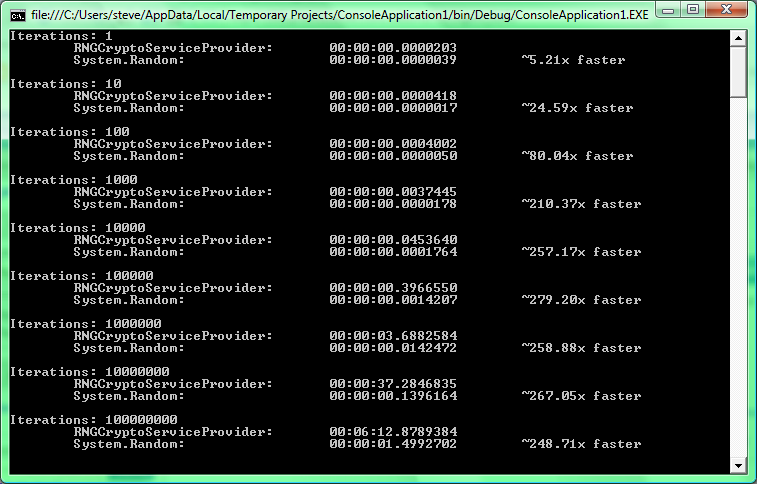
And here's the results:

image


The times varied a bit on my Core 2 Duo 2.50 GHz, 32-bit Vista laptop, but this isn't too far from the norm. It wasn't until 100,000 iterations that it took more that 1/10 of a second to finish, but at that point System.Random was ~279.2 times faster! The big thing is that even though the number of iterations are was growing by a factor of 10, RNGCryptoServiceProvider seemed to increase the time by more than a factor of 10.


So I guess the bottom line in the System.Random vs. RNGCryptoServiceProvider argument over slowness is in small numbers it doesn't greatly matter. Now if you're going to be generating more than 100,000 numbers in a very tight loop, it might be worth sacrificing "true" randomness with speed.

2009/01/09

Code Mash session: A Programmer's Guide To User Experience

  • Look for most experience, honest, and knowledgeable people for coming up with UX
  • When "interviewing" people for what they're looking for in the app, need to have a conversation.  Given through scenarios: "Process a credit card", "Answer a support call"
  • Put all scenarios into a very high level view into a specification document
  • Give a one-sentence description of what the app does
  • Group features together into sub-projects.  Go over these sub-projects with the users to see if they really fit together and make sense to the user.
  • "Is this REALLY something we're really going to need?" <-- feature that you might want to take away/never show to the user
  • "Is this something we CAN'T do without?"
  • "Maybe we need it..." <-- nice to have's
  • Use a sharpie marker for designing the interface so you don't get into the nitty-gritty details
  • No laptop during the design phase.  Gets you really thinking about the UI from the user's perspective
  • Use native controls for web pages because people know what the controls look like and know what to do with them.
  • Typography is extremely important.  Serif fonts are useful for print/small text sizes (< 14pt), San Serif more important for headers.
  • Black on White is not always readable.    Use a dark gray #333 or so
  • 1.5em line spacing helps improve readability
  • Whitespace is helpful because it improves readability
  • Blur the design.  Can you still tell what the point of the design is?
  • Designing interfaces is the same as Agile methodology.  Iterations are necessary to build them out appropriately.
  • Great way to verify usability when you toss the UI in front of the user
  • Watching a user sometimes provides the best way to find out if the UI is really working.
  • Paper prototyping can be the most useful that doesn't end up costing too much in terms of development time.

Overall the session was pretty decent.  A little short on length without the Q&A though. 

Code Mash Keynote #3: JavaScript Will Save Us All

The keynote was given by Eric Meyer.  After a few days of getting up MUCH earlier than I'm used to, I was mostly awake for keynote.  So overall here's some notes from it:

  • "How I learned to stop worrying and Love the DOM"
  • Typeface.js
  • Squirrelfish - JS engine in webkit.
  • The canvas tag can do amazing things.  IE doesn't support canvas, but there's a JS that will convert it to VML
  • dean.edwards.name/ie7 - fixes CSS issues of IE5 & IE6
  • Bluff - JS port of Graff graphing engine from Ruby
  • Web browsers can soon become "Speaking Browsers" in that they will read off the content to the user
  • Microformats are useful, but they're generally invisible to the user.  There's a Firefox plug-in that will pick them up, but it groups all of them on a page together and it isn't always obvious for the user to keep an eye on the bar.
  • Processing.js is an interesting project that makes use of the canvas element
  • Objective J came about as a way to carry Objective C to the browser
  • 280slides.com is a presentation software that's entirely web based
  • IETF is the group that takes the "Innovate first, standard second" as opposed to W3C which is "Standardize first, innovate second"

Code Mash Open Space Session: Getting Started in Speaking

Really great information from a group of about a dozen people including myself.  There was definitely a mix of people that have done several talks before, including larger conferences; some that have maybe spoke in front of coworkers or their user group once or twice and just wanted some more tips; and then those that like the idea of being a speaker, but not sure where to start.  Some keys points that were touched on:

  • Be passionate about what you're speaking on.  It's picked up on really quickly by the audience
  • When writing up your abstract and bio, it's a difficult balance to make it interesting and show that you're a trusted source that is worthy of the audience's time
  • Make sure to practice the speech, as well as prepare for possible failure points (bad hardware, code doesn't compile, etc.)

Code Mash: Guerilla SOA on the WCF

Presented by Joshua Graham. Part of Thought Works

Thought Works -> Twist - Collaborative Test Automation

  • SOA -> Same old architecture?
  • ESB -> Erroneous Spaghetti Box?
  • Agility -> Embracing change, designs that don't anticipate everything but facilitate change, enabling people to get things done
  • Simple, Incremental, Planetary Scale, Integration Architecture
  • SOAP was okay, but it had a LOT of downfalls because of tight coupling, versioning, etc.  It's why so many people go to REST
  • Many people approach WCF the same way the approach DCOM.  There's a remote object I'll call methods on, get it's state, etc.
  • Dynamic type of integration binding helps out a bit, but there's still a lot of overhead.
  • Syntactic binding allows a more open connectivity between service and client
  • What we wanted
    • Not exposing domain model types
    • Flexible content model
    • No types mirroring content model
    • consumer-driven contracts
    • light XSD
    • Schematron-style validation and message comprehension
  • [MatchAllEndpoints] attribute on a service class?

Overall not that great of a session.  The only "cool" part of the presentation is that he's using a Java client to talk to the service hosted in IIS.  Basically he presented a 100% pre-built solution that doesn't really go into the framework that much because it has one method that creates it's own SOAP message.  The one method processes the message and based on attributes/nodes that are present it will processes the message a certain way.  Defeats the purpose of using WCF because it does a lot of the work automatically.  Guess I'll have to hit on those points when I give my own presentation in March.

2009/01/08

Code Mash Keynote #1: Venkat Subramanian

So far there's been several shuffling from the printed schedule, including the order of the keynote speakers.  So the morning keynote for day 1 of Code Mash is Venkat Subramanian with the topic "Pointy-Haired Bosses and Pragmatic Programmers: Facts and Fallacies of Everyday Software Development."

Here's some summary points from the keynote:

  • The semicolon abuses the pinky.
  • Often head fallacies as Best Practices.  Generally a good sign it should be questioned.
  • Emotion, stress, bias, ignorance, impatience, past events, and intolerance all lead to fallacies about technology
  • Asking the question "Why?" will help fix issues.  In general it helps to ask it about 5 times a day to really learn something.
  • Fallacy: "More money & time will solve our problems".  Having clear goals for a project is the best way to get things done.
  • Service Packs sound much better than Patches.  You don't have a "problem", you have a "challenge".  Technologies aren't "stupid", they're "interesting"
  • The longer the project goes, the more prone it is for failure.  By 3 years it is almost certainly dead
  • Big companies can afford to be stupid by spending and spending without shipping software.  Government is the only "company" that can afford that model
  • "If your objective is to build what your customers wanted, you will fail.  You need to build what they still want"
  • Fallacy: "It's got to be good because it's from this large vendor"
  • "Using software because it's free is like getting into arranged marriage for the sake of money.  Where real love?"
  • Molding-Colossus Problem: we complain that software is old so we ask vendors to fiddle with it.
  • RDD - Resume Driven Design.  Using software because it will look better on your resume than what a project really needs
  • Infatuation is fitting the technology to the problem
  • Standardization before Innovation == BAD IDEA!
  • Fallacy: "We're off-shoring because it will save us money."  The gap in cost is closing in on 1:1.  Companies figured out they're methods are already failing, so they figured they might as well fail-for-less
  • Huge turnover in staff in India off-shore companies
  • "Hire smart skilled developers who can learn fast".  "Small team of highly capable developers is better than large teams of below average developers".  Off-shoring isn't bad, just take advantage of great talent world-wide.
  • Fallacy: "Dynamic Languages are not safe."
  • C programmers are generally excited and say "I can't wait to get to work and see what this crap does today!"
  • Java's 13 years old.  What do you expect of a 13 year old???? (in reference to having "2.0 - 1.1" result not be 0.9, but Groovy it works despite being on same JVM engine)
  • Generics in Java is screwy because of the backwards compatibility.
  • Royal Gorge Bridge is 1000ft above the Arkansas River.  It has a sign that says "No Fishing From Bridge"
  • "Humans have a natural tendency to complicate and confuse".  Especially noticeable at Starbucks with coffee sizes.
  • Developers are like prehistoric cave artists.  As soon as the creator walks away, any special meaning to the symbols lose all meaning.
  • "My code is not testable" == "My code and design sucks!"
  • Unit testing == exercising

Overall really good stuff, but his use of video, changing color schemes/fonts kind of hurt it.

2009/01/07

Code Mash Precompiler (Day 0) review

I already posted about my TDD in .NET session from the beginning of the day.  It was really good information to pick up.  It didn't trigger the light bulb for fully understanding TDD like I was hoping for, but it definitely brightened the topic quite a bit for me.  Guess I'll have to start digging into that more to grok it much better.

In the afternoon there really wasn't really any particular session that seemed absolutely appealing to me.  I've apparently haven't spotted where the Open Spaces sessions are happening so I took the law-of-two-feet approach.  I started out in the Kanban 101 session presented by David Laribee.  Decided on that one because, well, David Laribee is notably known for naming ALT.NET (not creating it, but giving all the principles a collective name).  Overall the session didn't provide me much additional knowledge.  The biggest useful piece of knowledge came from him giving a cursory overview of Mary Poppendieck's Value Stream Mapping session.  That's definitely a topic I want to spend more time digging into as it helps analyze a process and point out where bottlenecks are in resources, be they human or material.  It provides good documentation to take to management when you're fighting for additional resources to increase value in a team so more revenue can be brought into the company.  The other part of that session I caught dealt with setting up and using a Kanban board to track progress of items in the backlog.  I've seen this before and understand how they work, so while the in person explanation was interesting, it didn't help out that much.

While floating in and out of the Kanban session I wound up in the Windows Azure session.  Basically caught enough information to see that the UI for managing your slice of the cloud isn't impressive nor crappy; that the technology aspect of Azure is pretty solidly laid out and growing, but the political aspect still has a LOT to take into account before pricing & SLA's start being defined; that Azure was another one of Microsoft's "we've been toying with this idea, what do you developers think?" sort of programs; and all the examples they were going to run through are available from Azure's website.  The only useful piece of information I walked away with from the session was what steps to take to get your named bumped up in the queue of people being let into the closed testing of the live cloud.

By the end of the sessions most of the sponsors had started showing up and getting things set up.  And they're evil I tell you.  Pure evil.  They had Rock Band 2 set up.  Here's a picture of people getting into it after I rocked out a few songs.

After the dinner Carl Franklin and Richard Campbell got things set up for recording the panel discussion for an episode of .NET Rocks.  Richard gave a great retelling of the story of Goliath and the magnets it had in it (first told on an episode of Mondays).  I can't find which show it was, otherwise I'd link to it because it's a great story.  Then began the panel discussion on RIA.  The funny part was keeping an eye on twitter tags for Code Mash (#codemash and #codemash2009) you could see that every one of the panel guys had sent at least one tweet while the recording was going on.  And they were given a bottle of bourbon as a gift which they started off started drinking during the show (I'm sure it will be in the show when it's published).  The part you'll miss out on when you listen to the show is that when there was a few glasses worth of bourbon left in the bottle Carl kept looking around the audience and gesturing for people to have a glass.  That was too funny.

To finish off the day I made my way around the sponsor booths again and surrendered my contact information to even more companies.  Hey, they have awesome swag that'd be cool to win, but having about a 1/400 chance of winning I doubt I'll actually win anything.  And had another go at Rock Band.

I'm looking forward to the sessions tomorrow, which I'm sure there's going to be much more to cover since there'll be 5 sessions to attend.

Code Mash 2009: TDD in .NET

This will start my "blogging on the go" posts with primarily notes from the sessions I'm attending.  This class was pretty useful for digging into TDD if you're at least familiar with unit testing.  The lecture was primarily less than an hour with the vast majority of it being a really large pair programming session.  The instructor was Phillip Japikse.  Really good stuff

* 2 main type of testing: state-based testing; interaction-based testing

* "Software Defect Reduction Top 10 List" IEEE Computer January 2001

* state-based - initialize, provide initial data, interact with it, assert something changed (or did not), must test for both Happy & Unhappy paths

* Interaction-based - verify behavior of SUT, mock the object, ensure behavior acts

* Code Coverage - rough measure of what's tested.  Just another metric.  Roughly 80%

* Dependency Injection is also known as IoC.  Doesn't really cover the differences though.  Basically covers it's for separating instantiation/implementation.

* Constructor Injection; Setter Injection; Interface Injection

* SWAG = Scientific Wild Ass Guess

* Pre-requirements for TDD: Need requirements, ready access to the Product Owner, Source Control System

* no bugs, write opportunities for other developers to fix

* when refactoring, eliminate duplicate code or anything that isn't self-documenting if it's complex.

* writing tests - Name should describe the action of the SUT

* Add the correct Assertions

* Flush out the code to enable the build

* keep list of tests close to workstation - useful to write ideas about other tests on piece of paper (To Do items).  Keeps focus on current work.  Go for easiest ones first.  fresh sheet of paper every day, with not-done items as first items

* possibly leave the last test in a failed state to get you back into the mindset.  Helps jog the memory

* TDD should be applied to any code you actually write.  TED should be for Generated Code (somewhat...)

* FTW: QA team can actually come up with value-adding issues.

2008/10/04

Preventive Maintenance

As I'm sitting here waiting for the numbness from my root canal earlier to wear off, I'm thinking about the preventive maintenance I could have performed to prevent needing it.  The standard stuff comes to mind of brush on a more regular basis, floss or use mouthwash, visit the dentist at least twice a year.  You know, the basics.  Stuff that is fairly common knowledge, but it's a matter of taking the time out of an already busy schedule to do the work necessary.

How does this apply to software?  If you think about it, it parallels pretty well.  Having to fix a bug in production is much the same as spending time in the dentist chair getting a cavity fixed (or in my case, a root canal).  Even worse is a full outage due to a error lingering in the code base that could have been prevented early on.  Code audits done every week or two is similar to brushing and flossing daily to prevent rot.  Checking with users a few times a year ensures the product is still fitting their needs and performing as they expect.  Granted your dentist doesn't come to you checking if everything is okay, but a couple check ups a year still prevents bigger problems.

It even applies to IT professionals.  Sure everybody does backups because it needs to be done, but how often are the backups checked by restoring from them?  If a system winds up becoming corrupted and a backup fails, it's the same as having to have a tooth pulled.  Both have to be replaced entirely.  On a more regular basis they should be verifying the systems are running as expected.  No excessive CPU spikes, adequate free disk space, no bloated memory usage.

Just as a toothbrush and floss help with regular maintenance of your teeth, tools like unit testing and system monitoring help with hardware and software maintenance.  The real question is, how often do you practice your IS & IT maintenance?

2008/08/21

The joys of Apache webserver and modules

I've been fighting an issue with Apache 2.2.8 on Ubuntu 8.04.1 (Codename Hardy Heron) to get my Subversion repository to authenticate over LDAP for work. We had previously set it up on Apache 2.0 on Gentoo. It was a week long battle, but we got it working. I figured that since we figured it out on there it should be a pretty straight forward approach this time around. Yeah, that was wishful thinking!

Doing the standard Google searches I came across the step by step guides of how to configure it (most were building from scratch). With the beauty of apt-get I had everything I needed in no time at all (Seriously wish there was a Windows alternative to that...). I created the repository for Subversion, configured Apache and Subversion to start up automatically, and added in the Subversion modules to Apache (which threw me off as it was a link in /etc/apache2/mods-enabled to /etc/apache2/mods-available). Restart Apache and everything still worked so it was time to configure a location for the repository. So following the standard layout I found on every other Google search I set it to the following:

<Location /repos>
DAV svn
SVNPath /path/to/repository
AuthType Basic
AuthLDAPEnabled on
AuthLDAPAuthoritative on

Options Indexes FollowSymLinks
AllowOverride None
order allow,deny
allow from all

AuthName "Subversion Repository"
AuthLDAPBindDN "cn=Subversion User,dc=domain,dc=com"
AuthLDAPBindPassword UserPassword
AuthLDAPUrl "ldap://domain.com:389/dc=domain,dc=com?sAMAccountName?sub?(objectclass=user)"

Require valid-user
</Location>


I go to restart and I get a marvelous error message of:

Invalid command 'AuthLDAPEnabled', perhaps misspelled or defined by a module not  included in the server configuration


It wasn't until some repetitive googling later that I came across this amazing post that provided some insite:

http://www.linuxforums.org/forum/servers/124011-apache-ldap-authentication.html

With a little ingenuity, I figured out the correct set up for us was this:


<Location /repos>
DAV svn
SVNPath /path/to/repository
AuthBasicProvider ldap
AuthType Basic
# AuthLDAPEnabled on
AuthzLDAPAuthoritative on

Options Indexes FollowSymLinks
AllowOverride None
order allow,deny
allow from all

AuthName "Subversion Repository"
AuthLDAPBindDN "cn=Subversion User,dc=domain,dc=com"
AuthLDAPBindPassword UserPassword
AuthLDAPUrl "ldap://domain.com:389/dc=domain,dc=com?sAMAccountName?sub?(objectclass=user)"

Require valid-user
</Location>


Now to actually continue on with why I had to set up another Subversion server...

2007/09/14

Highly Dorky Nerd King

So came across this interesting little test via Continous Learner RSS (http://spietrek.blogspot.com/2007/09/nerd-test.html). So I'm a nerd and I'm proud!

NerdTests.com says I'm a Highly Dorky Nerd King.  What are you?  Click here!

2007/07/19

TV costs you at least $10,000/year

Came across an article about how TV costs you more than you may currently realize. In all honesty I never thought about it in terms of my worth, but I made the move to drop the expense of TV over two years ago. I ended up becoming a big fan of Blockbuster Online because at the time I had a store just a couple miles down the road from me. When they switched their business model to allow for the in store movie exchange I became hooked. Forget about Netflix where I might be able to see three movies a week, with Blockbuster I'm able to catch up on six a week (three from my online queue and three from the store). Lately I've been so busy with work that I don't even bother with trading the movies in at the store.

Although I haven't gone in the direction of making use of this extra free time from lack of TV, I do value the time away to not let my brain just rot. I've also noticed a funny thing about society in my lack of TV viewing: people form a lot of conversation around what's on TV. There's been several times when coworkers have asked me if I saw a TV show or even a commercial that was on the night before. That's when I remind them of my TV viewing habits and the conversation falls into silence. Some point me to Youtube to catch the commercial, but that I've tried to avoid as well. User generated content is all well and good, but the quality of that content leaves a lot to be desired and how much of it is actually education or beneficial in some way? I'd have to say almost none, but I'd be happy if somebody could prove me wrong.

2007/07/14

Login experiences for the standard end user

So I was making my way through my long self made RSS feed of webpages to read through and several of the pages were ones that require me to create an account on the site. Now in true Web 2.0 experience some of them allow you to browse around the site, even start adding personalized content without creating an account first. This in and of itself is a very cool trick I wish more content driven websites would embrace. But this isn't the point that I'm trying to make. The point is when it actually came time to create that account. Many people pick out a username for an online account and then stick with it at every other website they create an account at. This would be all well and good except there's no standards on what are valid characters in usernames and even passwords. I can't use symbols in my username or my password? Or numbers? Okay then, I'll just stick with something like 'password' to log into my account since you're asking to have my information stolen easily. Seriously, it's not that hard to accommodate those characters. And especially in the password since the site should be using some sort of cryptography anyways so that anybody going into the database can't see the password in plain text or be able to reverse the password.

For the username I can't see a purpose for explicitly denying symbols and in some cases numbers either. Unless the site is making use of symbols behind the scenes to state that a username has special attributes to it, there's no reason to deny the symbols. And if the site is doing this, they really need to reevaluate what they're trying to achieve because this kind of programming trickery just leads to headaches down the road.

So one solution that I've come across that works much better than remembering odd combinations of nonstandard usernames is to use a common email address as the username. Since I've come to focus all my email through one solution (namely Gmail), it's easier to remember what email address to use. Plus with a number of sites that send out the occasional reminders or notifications to the email address I can go to the site and be able to remember right away what the username and (generally) password are for it. What gets annoying is when sites explicitly make use of the email as the username, but don't label the text box as such. One of those tips that most developers keep overlooking: if it is hard to use, it will hardly be used.